Showing posts with label photography training. Show all posts

Thursday, January 05, 2012

From the Desk of the Intern....

Hello there, this is Devon.  I'm interning here at Avant-Garde Images/Understand Photography for a couple weeks as part of my school's internship program. So far I've been here for 3 days and I've already learned a LOT. The first day I worked on the computer a bit then went over to Peggy's studio because she had to take some head shots for a bank. When we got there she showed me a little of how to use the studio lights, which was much simpler than all the internet tutorials make it out to be. It was cool to watch how she posed them, which is something I never really thought about for head shots.

One of my pictures from the Studio Model Shoot
The next day I got to work in Photoshop Elements for the first time. It was a little tricky to get the hang of but once I got going it wasn't too hard. I designed two ads that day, one for a photography trip to St. Augustine and one for image sensor cleaning. But the best part of the day was going to the studio model shoot. It was SO much fun. Each group got three turns of 6 minutes with the models. I was so excited to use the studio lights, also extremely nervous, but it ended up being really fun and not too difficult because everyone was so helpful. Some of the pictures turned out quite well and I'm very glad I got to be a part of it.

On the third day we had to get up early to go the Von Liebig Center downtown where Peggy was going to be part of a question answer session. It was really interesting to listen to all professionals there. After that we went back and I worked on editing the pictures from the model shoot. I ran some errands to the post office and to a clients house to deliver some pictures. So far I've had a great time and I can't wait for another week and a half! :)

Saturday, July 09, 2011

Show and Tell - Photoshop Actions and Layers

We host Studio Model Shoots twice a month through Photography Naples. If you have a DSLR - come on down! We will help you with your settings and it's only $19. You will have so much fun!! www.PhotographyNaples.com

We had a fabulous model last time, Jessica Stone, who is a teen singing sensation. Jessica loves to dress up and we love it to! http://jessvocalist.bandvista.com/bio/

In this post, I'm going to explain how I achieved this look. I will assume you have basic Photoshop or Elements knowledge.
Here is the retouched image:
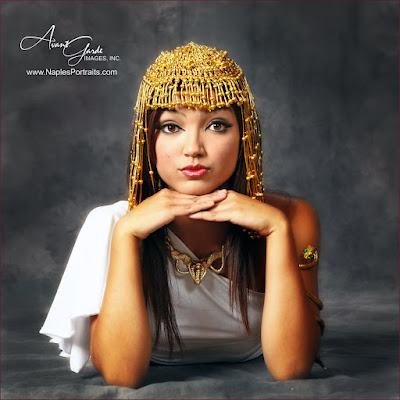
Instructions:
1. Convert the RAW file to JPEG in Adobe Camera Raw.
2. Make a copy of the background layer.
3. Run “Portrait Pop” action. Paint eyes, lips, headress and armband with white brush.
Portrait Pop, Shannon Beauford, 9/28/08 from www.atncentral.com (This may or may not work with Elements - if not, you can skip this step).
4. Reduce top layer to 88% (portrait pop is a little intense).
5. CTL E to merge one layer down.
6. Make a new copy of that layer.
7. Use Quick Selection Tool to choose floor under model.
8. Use burn tool to darken floor.
9. Deselect and burn a bit around top of picture.
10. Make another copy of the layer.
11. Desaturate picture (SHFT – CTL – U).
12. Add a Layer mask to that layer (it's at the bottom of the Layers Palette - Elements didn't come up with this option until Version 9).
13. Paint the model with a black brush to bring the color back.
14. Paint with a white brush to fix any mistakes. I love layer masks because you can easily fix your mistakes!
15. SHFT-CTL-E to flatten layers (or go to Layers - Flatten Image)
16. Add contrast of +18.
17. Crop as a square.

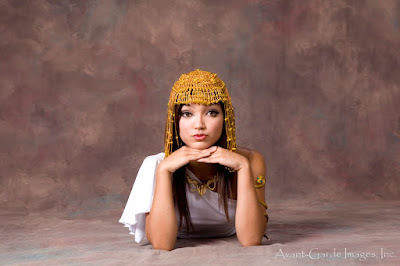
Here is the original picture:
Stay tuned for more photography tips! Better yet, join our Meetup group: www.PhotographyNaples.com.